AI visibility checker
See which sites AI assistants cite, and in what order
Ask the question your customers ask. ChatGPT, Gemini, Claude and Perplexity answer it with web search on, and you see every source each one cites, in order: which sites most assistants trust, where each sits in their lists, and whether your site or brand is cited or named.
- ChatGPT
- Gemini
- Claude
- Perplexity
- Grok
- Meta AI
- DeepSeek
 Gemini
 Claude
 Perplexity
 Meta AI
 DeepSeek
- Four assistants, one question
- Citations in order, side by side
- Your site cited and named, or not
About $0.38 per question, paid per lookup from your own key. What it costs

Most cited sites in AI answers
Every site any assistant cited, ranked by how many assistants cite it and how high. Each one shows which assistants cite it and at which place in their list of sources.

AI citations by assistant
One column per assistant with its sources numbered as it gave them. Hover a site to see where else it appears; your own site is highlighted. Each answer is underneath, with whether it names you.

How it works
How to use the AI visibility checker
- 1
Search
A keyword, a domain or a page, with the country, city or state, and language next to it.
- 2
Read the results
Volume, difficulty, rankings and links side by side. A repeat search loads at once.
- 3
Get the whole picture
Everything loads together. The address holds the search, so you can share it.
Use it to
AI visibility checker use cases
Find out if AI recommends you
Ask what a customer would ask and see whether any assistant cites your site or names your brand.
Find the sources that matter
The sites most assistants cite are the ones worth a mention, a review or a guest article.
Compare assistants
Each one answers differently. See which cite many sources and which cite few.
Track it over time
Add the question to a project to ask it again on a schedule and follow the trend.
What it costs
AI visibility checker pricing
About $0.38 per question. You pay the data provider for the lookups a search runs, from your own key, under a monthly limit you set. Answers are priced by the words read and written, so each varies a little. The same question within a day is free.
| Part of the search | Price |
|---|---|
| ChatGPT, with web search | about $0.17 |
| Gemini, with web search | about $0.06 |
| Claude, with web search | about $0.12 |
| Perplexity | about $0.03 |
| Grok, Meta AI or DeepSeek (optional) | varies, up to about $0.30 |
Search data
Start with $5 of free search data
Keyword, ranking and backlink data in OpenSEO comes from YepAPI. Sign up there and new accounts get $5 in free credit, for a limited time. That is enough to try every tool before you spend anything.
- 1
Sign up at YepAPI
New accounts get $5 in free credit, for a limited time.
- 2
Copy your API key
It is on your YepAPI dashboard once you sign in.
- 3
Paste it into OpenSEO
During account setup, or later in Settings. Every tool works from there.
The free credit is YepAPI’s limited-time offer and may end. After it, you pay YepAPI per lookup at its price. OpenSEO lists every call with its cost and a monthly limit caps what you spend. See pricing
SEO glossary
What is AI visibility?
AI visibility is a measure of how often, and how prominently, AI assistants mention your brand or cite your website when people ask them questions. It covers answer engines such as ChatGPT, Gemini, Claude and Perplexity, plus AI features inside search engines, such as Google’s AI Overviews and AI Mode.
Related SEO terms
AI citations are the links an AI assistant shows as sources for its answer. Being cited means your page helped build the answer.
Generative engine optimization (GEO)
Generative engine optimization (GEO) is the practice of improving how often AI-generated answers mention your brand and cite your pages.
Answer engine optimization (AEO)
Answer engine optimization (AEO) is optimising content so search features and AI assistants use it to answer questions directly.
Brand mentions are references to your brand name on other websites or in AI answers, with or without a link to your site.
ChatGPT search is the feature that lets ChatGPT search the web and answer with up-to-date information and links to its sources.
AI visibility checker FAQ
Is this AEO or GEO?
Both names describe the same work: being the source AI assistants cite and the brand they name. Answer engine optimisation (AEO) and generative engine optimisation (GEO) start with knowing where you stand, which is what this check shows.
Why do the answers change?
Assistants write a new answer every time and search the web as they go, so sources shift between runs. Asking on a schedule in a project shows the trend rather than one snapshot.
What counts as named?
Your domain or a brand name you enter appearing in the answer’s text. Links and citation markers do not count, so a source list alone does not make an answer name you.
Do I need a project?
No. The SEO tools work on their own, in any market you pick. Keywords you find can be saved to a project in one click when you want to track them.
Can I share a result?
Yes. The search, the market and the open tab are all in the page address, so a link or a bookmark opens the same view. Anyone opening it runs the search with their own key; a repeat of something already looked up is served from the cache for free.
More SEO tools

Keyword analysis tool
In the app: Keyword overview
Difficulty, volume, traffic potential, volume by country, keyword ideas and the live top 10 for any keyword, in any country, state or city.

Keyword generator
Free to try, no accountIn the app: Keyword ideas
Matching terms, related searches, questions and Google suggestions from one seed keyword, with volume, difficulty, intent and trend.

Keyword difficulty checker
Free to try, no account
Difficulty of up to 1,000 keywords at once, from 0 (easy) to 100 (hard), sorted into what you can win now and what needs more links first.

SERP checker
Free to try, no account
The live top 10 to top 100 for any keyword on desktop or mobile, in any country, state or city, with every result’s authority, links and traffic.

SEO audit tool
In the app: SEO audit
Traffic, rankings, keywords, backlinks and competitors of any domain, with findings and the opportunities to act on first.
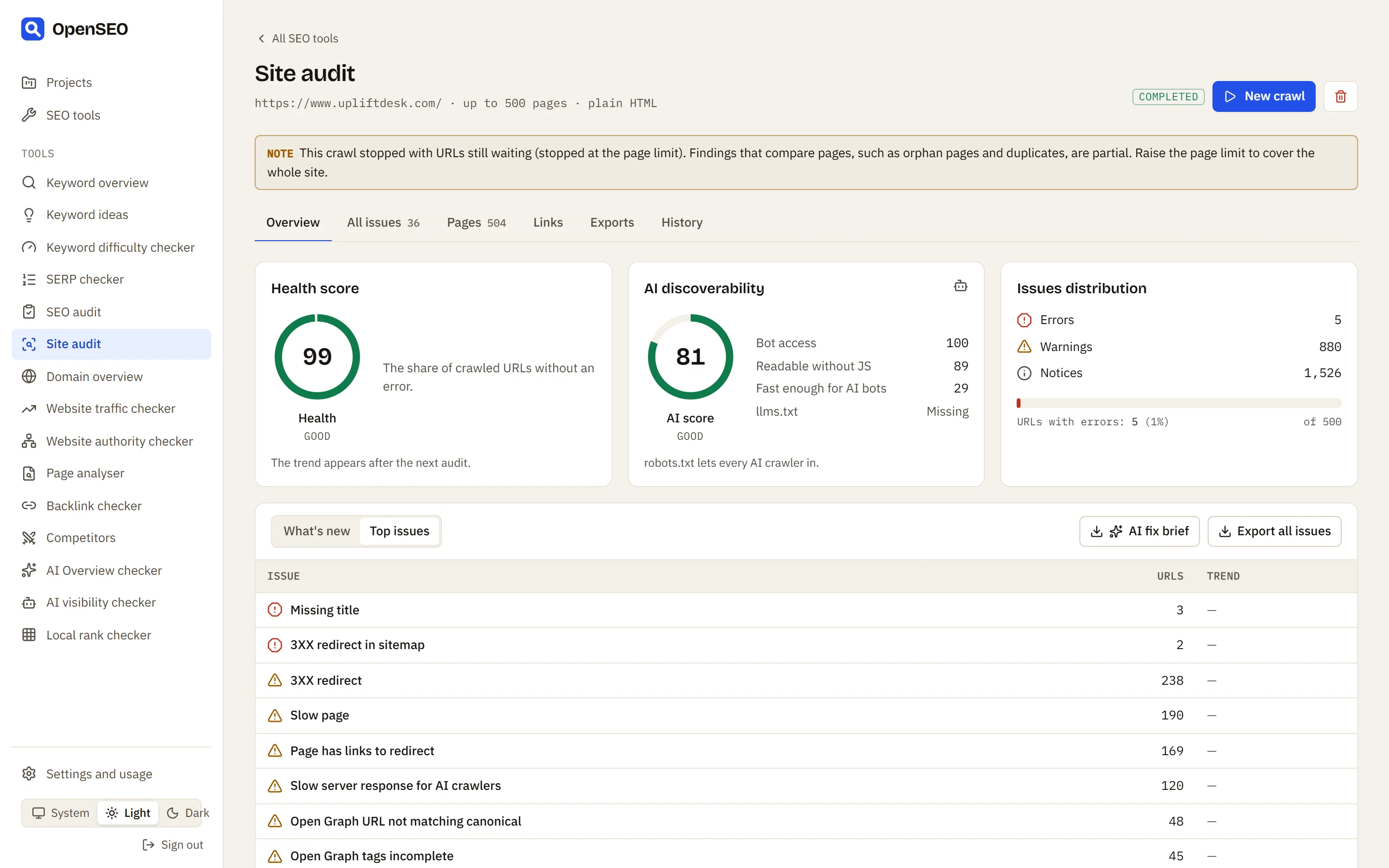
Site audit
A free SEO crawler: up to 500 pages of any site, 117 technical checks, status codes and links, and every fix exported for a coding agent.

Website SEO analysis
In the app: Domain overview
Traffic and its value, keywords, links, authority, ranking spread, top keywords, top pages and competitors of any domain.

Website traffic checker
Free to try, no account
Estimated Google traffic of up to 100 websites side by side: organic and paid visits and keywords, and each site’s share of the group.

Website authority checker
Free to try, no account
Domain Rating, referring domains and backlinks of up to 10 sites side by side, to see how strong a site is next to its competitors.

On-page SEO audit
In the app: Page analyser
Authority, links and traffic of any page, its title, description and headings checked, the keywords it ranks for and its strongest backlinks.

Backlink checker
Totals, monthly history, strongest backlinks, referring domains, anchors, top linked pages and link intersect for any domain or page.

SEO competitor analysis
In the app: Competitors
Organic competitors of any domain, the keyword gap with any of them, and the sites that rank most for a list of keywords.

Keyword gap analysis
In the app: Keyword gap
Keywords a competitor ranks for that a site does not, and the keywords both share, with volume, difficulty and positions side by side.
Backlink gap analysis
In the app: Backlink gap
The websites linking to your competitors but not to you, most competitors first, with their authority: a ready list of link building prospects.

AI Overview checker
Free to try, no account
Check up to 100 keywords at once for Google AI Overviews and every other SERP feature: which sites each AI Overview cites, and whether yours is one.

Local rank checker
Google Maps rankings for any keyword across a grid around a city: the top 20 businesses at every point, and any business’s rank in each cell.
